What is HTML?
HTML is the foundation of every website you see on the internet, including the portals where you check your UGC NET, SET, or KVS results. Many students think HTML is a programming language, but for your exams and your IT career, it is crucial to remember that HTML is a markup language used to structure web pages
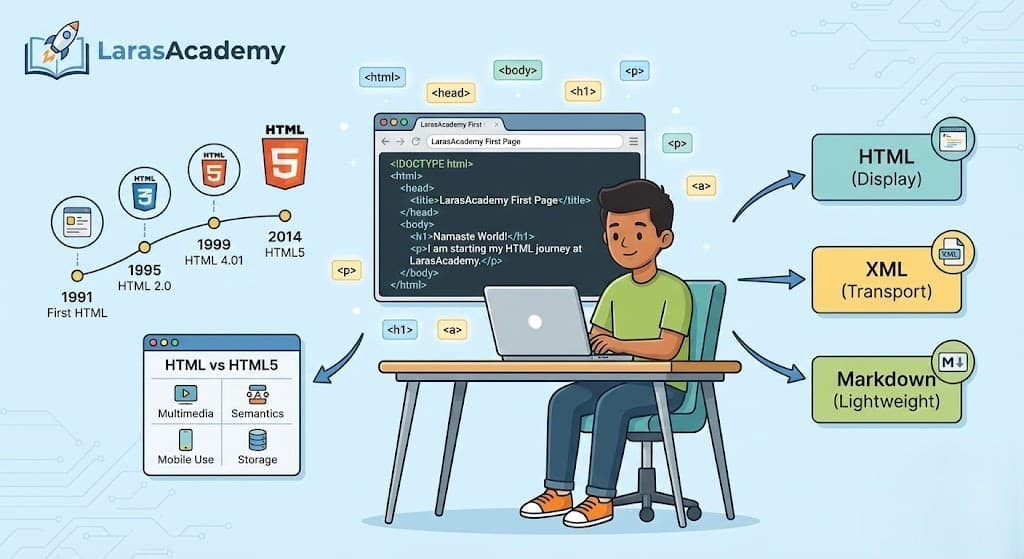
1. Defining HTML: The Language of the Web
HTML stands for HyperText Markup Language
- HyperText:
When you click a link on the NTA or Telangana State portal to view your hall ticket, you are using hypertext—clickable text that connects one web page to another. - Markup:
Markup means placing tags around text so that the browser knows what is a heading, paragraph, image, link, or button.
Key exam points:
- HTML is a markup language, not a programming language (no variables, loops, or conditions by itself)
- HTML works together with CSS (for design) and JavaScript (for logic and interactivity)
2. Evolution of HTML (1991 to HTML5)
Understanding the versions of HTML is important because theory questions often ask “Match the Following” or “Year vs Version”
- 1991 – First HTML (Tim Berners‑Lee):
The first version defined basic documents with headings, paragraphs, and links for early CERN internal pages. - 1995 – HTML 2.0:
The first formal standard published by the IETF, capturing the core features in use on the early Web - 1997–1999 – HTML 3.2 and HTML 4.01:
HTML 4.01 (1999) became the dominant version used in schools and colleges in the early 2000s, including many Indian textbooks - 2014 – HTML5 (Modern Standard):
HTML5 was finalised as a W3C Recommendation on 28 October 2014 and is the current foundation of modern websites and web apps
Exam‑ready memory tip:
- Remember: 1991 (Birth), 1995 (HTML 2.0), 1999 (HTML 4.01), 2014 (HTML5).
3. Why HTML5 is a Game Changer (Especially for Students)
HTML5 is designed for today’s mobile‑first, app‑like web, which matches how most students consume content—through smartphones and low‑cost laptops.
HTML vs HTML5 (Practical View)
| Feature | Older HTML (e.g., HTML 4.01) | HTML5 (Modern HTML) |
|---|---|---|
| Multimedia | Depended on external plugins like Flash for audio and video. | Native <video> and <audio> tags; no plugin required in most browsers. |
| Semantics | Heavy use of generic <div>, less meaning in structure. | Semantic tags like <header>, <nav>, <section>, <article>, <footer>. |
| Mobile Use | Not designed for responsive layouts; required workarounds. | Works smoothly with responsive design via CSS and meta viewport. |
| Storage | Mainly cookies with small storage and extra overhead. | localStorage and sessionStorage for larger, fast, client‑side storage. |
Why this matters for exams and jobs:
- Viva questions often ask: “Why was Flash removed?” or “Name two HTML5 features for multimedia.”
- Indian IT companies expect freshers to know semantic HTML and responsive design basics, not just old <font> and table‑based layouts.
4. How to Start: Your First Lab Practical
You do not need a high‑end machine in HITEC City or Bengaluru to start learning HTML; a basic system in your college lab or home is enough.
Step‑by‑Step: Creating Your First HTML Page
- Open a text editor:
- Windows: Notepad
- Cross‑platform: VS Code, Sublime Text, or any simple code editor
- Type the basic HTML5 structure:
- <!DOCTYPE html> tells the browser to use HTML5.
- <meta charset=”UTF‑8″> ensures Indian languages and special characters display correctly.
<!DOCTYPE html>
<html>
<head>
    <title>LarasAcademy First Page</title>
</head>
<body>
    <h1>Namaste World!</h1>
    <p>I am starting my HTML journey at LarasAcademy.</p>
</body>
</html>- Save the file correctly:
- File → Save As…
- File name:
index.html - Save as type: All Files (if using Notepad)
- Encoding: UTF‑8 (recommended)
- Open in a browser:
- Double‑click
index.htmlor right‑click → Open with → Chrome/Edge/Firefox
- Double‑click
Common mistakes observed in lab exams:
- Saving as
index.txtinstead ofindex.html. - Missing closing tags (like not closing <p> or <html>
- Using capital extensions like
.HTMLis usually allowed by browsers but may confuse beginners in some OS environments.
5. HTML vs XML vs Markdown (From Exam Perspective)
Competitive exams often test conceptual differences between markup formats.
| Aspect | HTML | XML | Markdown |
|---|---|---|---|
| Primary use | Display and structure data in web pages. | Store and transport structured data. | Easy‑to‑write documentation that converts to HTML. |
| Tag definition | Predefined tags (<h1>, <p>, <a>). | User‑defined tags (<student>, <result>, etc.). | Uses symbols (#, *, _) instead of angle‑bracket tags. |
| Syntax rules | More forgiving; browsers try to correct minor errors. | Strict; requires proper nesting and closing of tags. | Simple plain‑text rules, interpreted by a converter. |
| Typical usage | Web pages, online forms, front‑end UI. | Data exchange in APIs, configuration files. | README files, notes, blogs (e.g., GitHub, documentation). |
Exam shorthand (“Lara Cheat Sheet”):
- HTML → “Display data in browser with predefined tags.”
- XML → “Transport/store data with user‑defined tags.”
- Markdown → “Lightweight syntax for writing web‑ready content quickly.”
TEST YOUR KNOWLEDGE
You can view correct answers after you submit your responses.