Welcome again, If text is the soul and images are the personality of your site, then Tables are the Organizational Backbone. Whether you are looking at a cricket scorecard, a college timetable, or a stock market report, tables help us make sense of complex data at a glance.
In this masterclass, we will master the art of data organization, learn the “Expert Edge” of merging cells, and prepare for UGC-NET , Technical Interviews and other teaching job exams.
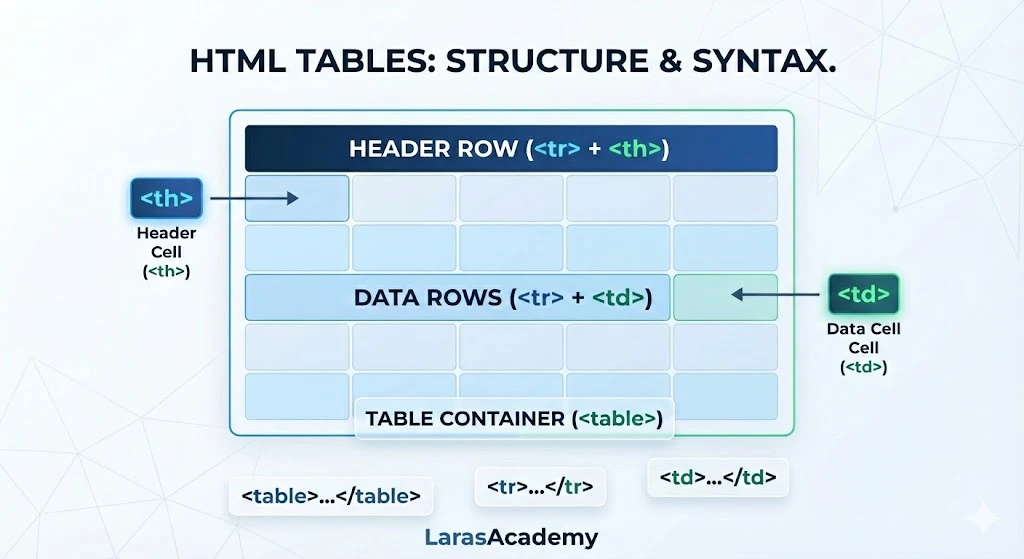
1. Understand HTML Tables – “School Timetable” example
Think of an HTML table as a Physical Attendance Register or a School Timetable:
- The Register (
<table>): This is the entire book or the frame of the chart. - The Horizontal Rows (
<tr>): These represent each student (one row per student). - The Header Labels (
<th>): These are the top labels like “Name,” “Roll No,” and “Subject.” They are usually bold because they are the “Leaders” of the column. - The Individual Cells (
<td>): This is the “Data”—the specific attendance mark or name written in one small box. - Double Periods (
colspan&rowspan): If a Physics lab takes up two time slots horizontally, that’s a colspan. If a sports event lasts two days vertically, that’s a rowspan.
2. The Anatomy of a Table
HTML tables are built “Row by Row.” You must open a row, fill it with data, and then close it before starting the next.
Basic Code Structure
HTML
<table border="1">
  <tr>
    <th>Course</th>
    <th>Duration</th>
    <th>Mentor</th>
  </tr>
  <tr>
    <td>HTML Masterclass</td>
    <td>4 Weeks</td>
    <td>Lara</td>
  </tr>
</table>
3. Advanced Layout: Merging Cells
This is a favorite topic for Exam Questions and Lab Practicals.
| Attribute | Action | Logic |
colspan="n" | Merges Columns | Combines cells Horizontally (across columns). |
rowspan="n" | Merges Rows | Combines cells Vertically (down rows). |
4. Styling for Success
Google prefers tables that are readable and mobile-friendly. Using “Zebra Striping” makes your data much easier for students to follow.
CSS
/* Professional Table Styling */
table {
  width: 100%;
  border-collapse: collapse; /* Removes double borders */
}
th, td {
  padding: 12px;
  border: 1px solid #ddd;
}
tr:nth-child(even) {
  background-color: #f2f2f2; /* Zebra Stripe Effect */
}
th {
  background-color: #004a99;
  color: white;
}
Pro-Developer & Exam Success Tips
Development Tips (For Professional Portals)
- Never Use for Layout: In the 90s, developers used tables to design entire websites. Today, this is a huge mistake. Tables are for Data only. Use CSS Flexbox/Grid for layouts.
- Responsive Tables: Large tables break on mobile. Always wrap your table in a
<div style="overflow-x:auto;">so mobile users can scroll sideways. - Accessibility: Always use
<th>for headers. Screen readers use these to explain the data to visually impaired students.
Exam Tips (For UGC NET / PGT / Technical Interviews)
- Default Alignment: By default,
<th>text is Bold and Centered, while<td>text is Regular and Left-aligned. - The
border-collapseProperty: If asked how to make a table look “clean” with single-line borders, the answer is the CSSborder-collapse: collapse;property. - Empty Cells: An empty cell is written as
<td></td>. If it’s missing, the table structure might break. - Tag Hierarchy: Remember the order:
<table>→<tr>→<th>/<td>. You cannot place a<td>directly inside a<table>without a<tr>.